Description
Live Streaming for Hifod
Turn Hifod into a Complete Live Streaming Platform
Give your members the ability to go live directly from their camera, while other users can watch, chat, like, send gifts and support their favourite creators — all from inside your Hifod website.
No complicated setup. No additional streaming software for your members. Just open the Live Streaming feature and start broadcasting.
🎥 A Complete Live Experience
The plugin provides dedicated experiences for both viewers and broadcasters, designed specifically for live content.
For Viewers
Watch live broadcasts in a modern, interactive interface with everything happening in real time.
- Full-size live video player
- Pulsing LIVE indicator
- Real-time viewer count
- Streamer's name, title and Follow button
- Live chat alongside the video
- Like button and floating heart animations
- Virtual gifts using your site's own gift system
- Top supporters displayed below the chat
- Easy access to follow and interact with creators
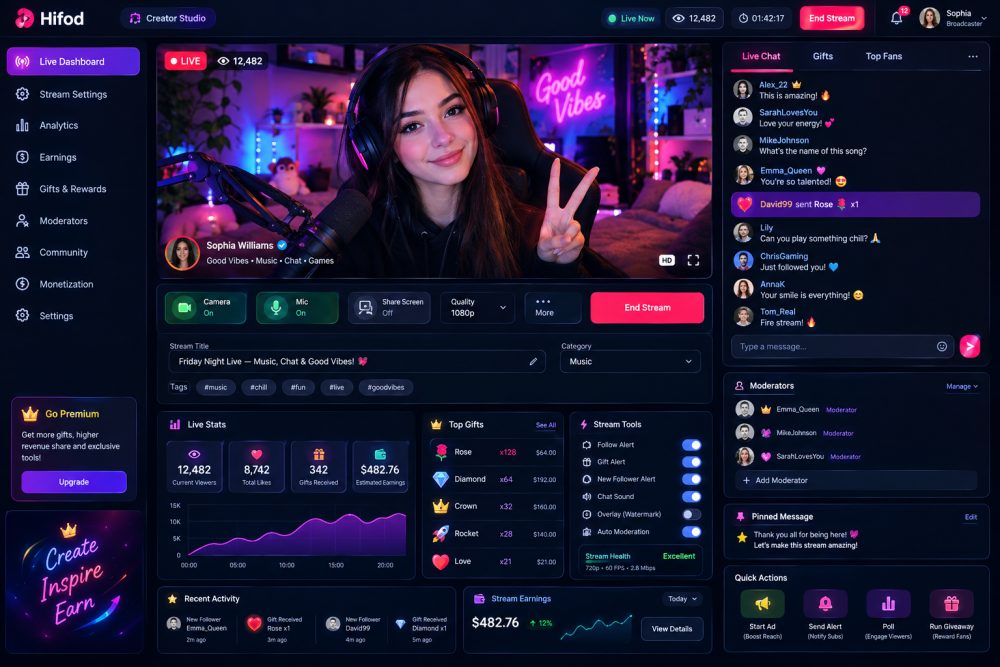
🎙️ For Broadcasters — Creator Studio
Give your creators a professional dashboard to manage their live streams and monitor performance while broadcasting.
- Real-time viewer count
- Live stream timer
- Peak viewer statistics
- Gifts received
- Earnings from the current broadcast
- Live viewer activity chart
- Top gifts ranked by value
- Live chat
- Gifts management tab
- Top Fans tab
- Camera and microphone controls
- Secure channel key
- Copy stream link button
- Confirmation before ending a live stream
💰 Built-In Gifts & Earnings
Live gifts are connected directly to the existing Hifod wallet and commission system.
That means you can use the same:
- User wallet balances
- Transaction ledger
- Commission percentage
- Gift system
- Earnings structure
There is no separate payment system to manage or reconcile.
Creators can see what they have earned, while your platform continues to receive its configured commission.
🔴 Go Live in Seconds
Before starting a broadcast, creators can access a dedicated Go Live page with camera preview, allowing them to check their camera and microphone before going on air.
Streams can be configured as:
- 🌍 Public
- 👥 Followers Only
📺 Live Browse Page
Give your members one place to discover what's happening across your platform.
The browse page can display:
- Live streams currently on air
- Stream titles
- Creators
- Viewer counts
- Finished broadcasts
Make it easy for users to discover new creators and join streams that interest them.
🛡️ Built With Security in Mind
Streaming permissions are handled securely on the server.
Credentials are never exposed directly to the browser. Each permission is scoped to:
- One channel
- One user
- One hour
Broadcasting permissions are validated by the server rather than being trusted from the browser.
If a broadcaster closes their browser unexpectedly or leaves a stream running after a crash, the stream can automatically close instead of remaining active indefinitely.
⚙️ Admin Controls
Administrators have control over the live streaming system from the Hifod admin panel.
Configure:
- Enable / disable live streaming
- Maximum stream duration
- Streaming credentials
- Streaming-related settings
🎨 Theme & RTL Support
Designed to integrate with Hifod and works with:
- Default Theme
- Golden Theme
- Violet Theme
- Right-to-left (RTL) layouts
🚀 Requirements
Hifod 1.4.0 or later
A free Agora account is required for video streaming.
Simply add your Agora App ID and Certificate through the Hifod admin panel and you're ready to configure live streaming.
Build Your Own Live Community
Turn Hifod from a social network into a platform where creators can broadcast, interact with their audience and earn through live gifts.
Everything creators and viewers need for an engaging live experience is brought together in one powerful plugin.
🔑 Demo
Website : demo.hifod.com ( click live stream )
Username demo
Password : demo1234
Or create New Account
- Multi-platform support
- Clean admin panel
- Full documentation
- Lifetime updates
No reviews yet — be the first to review this script.
No questions yet — ask the seller anything.