Description
Transform your Sngine community into a complete AI-powered platform featuring an AI Assistant, Image Generation, Automation, Subscriptions, Token Systems, and powerful monetization tools — all integrated 100% natively with zero core file modifications.
🚀 Key Highlights
- 100% Native Sngine Integration: Seamlessly integrates into your existing setup without altering Sngine core files.
- Modern AI Engines: Built-in native support for OpenAI & DeepSeek models.
- Full Monetization Suite: Earn recurring revenue using token packages, subscription tiers, and pay-per-use systems.
- Complete Admin Control: Oversee 80%+ of the module's behavior directly from an expanded AdminCP with no coding required.
- Future-Proof Architecture: One-click updates designed to remain update-friendly with future Sngine versions.
🌟 Comprehensive Feature Breakdown
🤖 Custom AI Personality System
Give your community access to highly tailored AI experiences or restrict exclusive traits behind a premium paywall:
- Fully customizable AI Name, Avatar, Welcome Message, and System Prompts.
- Custom conversation interface colors, themes, and animated background effects.
- VIP-Only Personalities: Lock specialized AI personas to specific user tiers or packages.
💬 Advanced Conversation Management
Complete UI empowerment for your community members:
- Pin & Unpin: Keep crucial conversations anchored to the top.
- Rename & Delete: Full control to clear out or label chat logs.
- Folder Organization: Organize chats into custom color-coded folders with emojis (Work, Personal, Coding, School, Research, etc.).
🎨 AI Image & File Gallery
Integrated asset hub to automatically organize every generated creation:
- Centralized Storage: Keeps AI Images, Uploaded Files, and AI Creations categorized.
- Download History: Quick access to retrieve previously generated media anytime.
⚙️ Standalone User Settings Center
A dedicated user management portal operating alongside Sngine:
- Account Settings: Light Mode, Dark Mode, Language Selection, and Package Info.
- Preferences: Custom Message Density, UI Preferences, and Conversation Settings.
- Data Management: Export/download chat histories, delete stored logs, and clear AI memories.
- Billing & Usage: Live token balances, remaining usage credits, and plan details.
- Integrated Support Pages: Terms, Privacy Policies, Community Rules, FAQ, and Release Notes.
💳 Flexible Token & Monetization System
Turn your Sngine platform into a recurring revenue engine:
- Pricing Models: Monthly Plans, Yearly Plans, Pay-Per-Use, Freemium Tiers, and Unlimited Subscriptions.
- Admin Pricing Controls: Set custom token costs per action, define daily user limits, and edit global balances.
- Automation: Built-in Cron System to automatically reset free user token allowances.
📊 Powerful Admin Control Panel (AdminCP)
- User & Token Management: Track individual token balances, manage user memory stores, review user prompts, and instant-search/block users.
- Package Management: Set pricing for weekly, monthly, and yearly plans, manage token bundles, and enforce custom limits.
- Analytics Dashboard: Monitor total AI requests, generated images, active users, popular system commands, memory usage, and user feedback ratings.
- System Configuration: Configure API providers, token consumption costs, default themes, system features, custom commands, and moderation filters.
📋 Compatibility & Requirements
MetricRequirement / StandardSoftware RequiredSngine Version 4.0+Core File Impact0% (No modifications to Sngine core)License RequirementActive Sngine License RequiredSupported AI ProvidersOpenAI, DeepSeekCoding NeededNone (Fully controlled via AdminCP)
🏷️ Licensing Options
Regular License — 39€
- Install on 1 Domain
- Monetize/Charge users
- Cannot remove copyright notices
- Cannot resell this script
- Free Lifetime Updates
- 6 Months of Support
Extended License — 99€
- Install on 1 Domain
- Monetize/Charge users
- Can remove copyright notices
- Can resell this script as part of an end product
- Free Lifetime Updates
- 1 Year of Support
🛡️ Guarantee & Support
- 100% Secure Code Base
- Active Ongoing Development
- Free Updates Forever
- Trusted by Sngine Community Owners
What's New?
Update 1.4 – September 4, 2026
New Features
- Added Scope Restriction — confine the assistant to specific allowed topics using a real AI classification call
- Added Hero / Unit Combos — ground gaming-community tactical questions in admin-curated pairing data instead of AI guesses
- Added Troop / Unit Calculator — exact, server-computed resource training/upgrade answers for gaming communities, never left to the AI to calculate
- Added Time-zone conversion — EchoAI now actually uses each user's detected browser time zone to answer "what time is X for me" questions with a real computed time, instead of leaving it unused
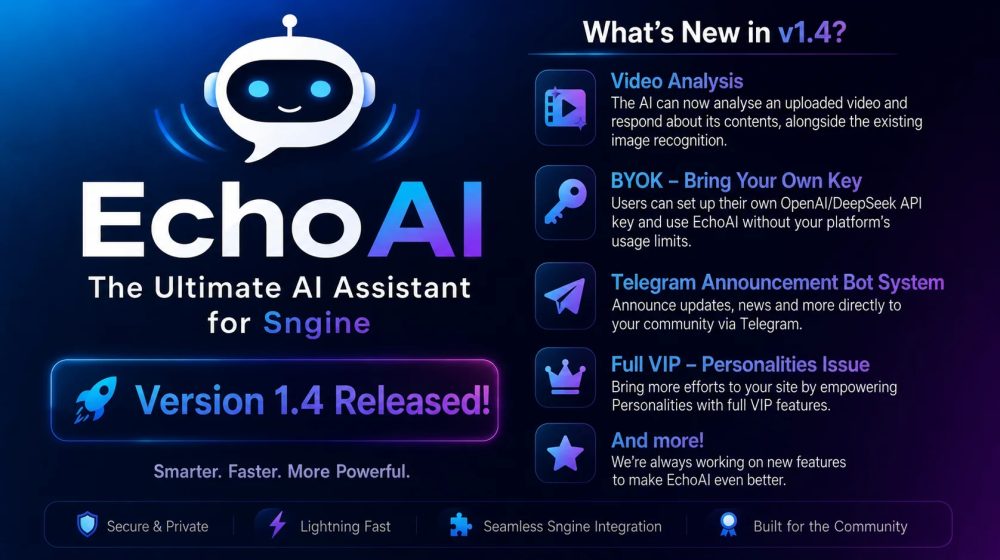
- Added Video Analysis — the AI can now analyse an uploaded video and respond about its contents, alongside the existing image recognition
- Added Feedback Buttons
- Added AI-powered info / bug-fixing system in AdminCP
- Added BYOK — Bring Your Own Key: users can set up their own OpenAI/DeepSeek API key and use EchoAI without your platform's usage limits
- Added Telegram announcement bot system
- Added Ability for Personality users to create Custom Personas
- Added Ability for Personality users to create / replace Quick Action modification
- Added AI timestamps — the current time and day are now included in AI responses
- Added Search features on AdminCP
Revamped
- Revamped Coding Playground Pro — responsive layout, theme-matched dark/light design, syntax highlighting, and a properly sandboxed live preview
- Revamped Error Log system in AdminCP — improved for support use
Fixed
- Fixed A bug where the AI could receive a user's own message duplicated as two consecutive turns, causing it to falsely claim "you typed that twice" — including on the very first message of a brand-new conversation
- Fixed A crash in a background media-cleanup routine that could take down every page load if the database's legacy files table didn't have the exact expected column names — now uses the correct columns and can no longer bring down the site even if a future mismatch occurs
- Fixed The Sngine Site URL setting being hardcoded at install time with no way to change it afterward except direct database access — it now has its own editable field in Admin → Settings
- Fixed a bug with conversation's Pin/Edit/Delete controls in the chat sidebar staying stuck open instead of only appearing on hover or via a small dedicated button
Update 1.3 – August 21, 2026
New Features
- Support for OpenAI GPT-5.6 — Sol, Terra, and Luna
- Ability for admins to create custom subscriptions directly through EchoAI, independently of Sngine
- Ability for admins to enable a payment provider — PayPal or a custom provider — directly inside EchoAI
- Ability for users to share conversations
- Ability for Personality users to change their Quick Actions
- Ability for Personality users to replace individual Quick Actions
- Ability for admins to create custom subscriptions with or without Sngine (requires the Extended add-on)
- OneSignal push notification when an image finishes generating
- New Send Test Notification button under Admin → Settings → Notifications, allowing admins to verify their OneSignal setup with one click
- More capabilities added to the Coding Playground
- Ability to automatically delete files, chats, and folders after a specified period, such as 1 week
- AI timestamps — the current time and day are now included in AI responses
- Ability for users to collapse or expand the Recent Chats section
- New Error Log in AdminCP
- New Stop Generating button
- New day-level organization for AI-generated images, making it easier to find images from a specific day without opening every file in a month
- Automatic self-healing database checks that repair a small number of known misconfigured columns on older installations without requiring manual SQL
- Added Live Preview ( Live Demo )
Revamped
- Upload Experience — images and files are now staged as a small preview above the message box, allowing users to add a caption, cancel, or send the attachment before it is posted
- Library Modal — redesigned with pill-style tabs, refined card styling, and clearer empty states
- Image Generation Progress Indicator — redesigned with a clearer and more modern animated interface
- EchoBot Core — improved intelligence and overall performance
- Coding Playground Core — improved code quality and expanded functionality
Fixed
- User avatars rendering as squares instead of circles
- AI response speed and performance issues
- API pinging/testing issues in Admin Panel → API Keys
- "Table 'sessions' doesn't exist" error
- "Memory: No facts extracted from conversation" error
- "Memory: Auto-save triggered" error
- HTTP 500 error when opening a new chat immediately after receiving an AI response
- Library modal tabs (All / Images / Files / Playground) collapsing into an invisible sliver
- Playground Open and Delete buttons displaying with the browser's default unstyled appearance
- AI-generated images and uploaded files returning 404 errors when EchoAI is installed in a subdirectory instead of the site root
- Generated images not being written to disk on hosts where allow_url_fopen is disabled
- Files and images being posted immediately without allowing users to add a caption or cancel
- Chat losing its scroll position or becoming stuck after uploading an image
- Two separate database errors — "Unknown column" and "doesn't have a default value" — that could occur during file uploads on certain older installations
Please, during the initial installation or any update, run yourdomain.com/echoai/migrate_media_to_db.php once. After it has been successfully executed, delete the file from the root directory of EchoAI.
Update 1.2.1 – August 3, 2026 -
Fixed:
- Fixed issues with OpenAI API activation.
- Fixed issues with the Coding Playground and OpenAI API keys.
- Fixed issues with EchoBOT and OpenAI API keys.
- Fixed various API model-related errors.
Note: Thanks, @cadillaccj, for reporting the bug to our team! We really appreciate your feedback and for helping us improve EchoAI.
Update 1.2 – July 30, 2026
New Features
- New Library System for managing Files and Images
- New Playground System for advanced AI testing and interactions
- New Coding Playground Plugin (Free) for code editing and live preview
- New EchoBOT - Interface with yout Sngine (PREMIUM) addon (Buy here)
- Ability for users to upload files and use the File Scan feature
- Ability for users to import conversations from other AI platforms
- Ability for admins to set file limits per package
- Ability for admins to enable / disable the File Scan feature
- Password Protection for Files (users can add a lock password when creating files)
New Management Options
Delete Options:
- Delete All Chats
- Delete All Folders
- Delete Chats Only
- Delete Folders Only
Download Options:
- Download All Chats
- Download All Folders
- Download Chats Only
- Download Folders Only
Fixed
- Improved file management stability
- Improved library system performance
- Various minor UI and system improvements
Update 1.1.1 – July 6, 2026
Added
- Ability for admins to Enable / Disable Thinking Mode
- Ability for admins to set limit per package for Memory usage
- Ability for admins to reset Memories automatically via Cron Jobs or manually
- Ability for admins to track Memory Statistics
- Memory Settings in User Menu
- Live Thinking Mode
Fixed
- Thinking Mode issue
- Memory issue
- Issues with ghost typing cursor-dot
Revamped
- Thinking Mode button (collapse / open redesign)
- Design of Thinking Mode messages / responses
Modified
- Documentation updates
- Language updates (English, Greek, German, Brazilian Portuguese)
Removed
- Ghost typing cursor-dot
Update 1.1 – July 5, 2026
New Features
- Database-Based Settings System
- Pin & Unpin Conversations
- Conversation Folders
- Custom Download Filenames
- New Image Gallery System
- Light & Dark Mode Toggle in AdminCP
- Native Sngine Post Search Inside EchoAI
- Custom Support & About Boxes
- Complete Sidebar Redesign
- Complete Main Chat Interface Redesign
- Brazilian Portuguese Language Support
Improvements
- Faster Settings Management
- Improved Mobile Experience
- Better UI Consistency
- Enhanced User Navigation
- Improved Gallery Performance
Update 1.0.1 – June 23, 2026
Fixed
- Issue where editing packages could trigger a "User Not Found" error
- Buttons not displaying properly on mobile devices
- AdminCP desktop navigation menu being cut off
- Broken buttons and layout boxes in mobile user menu
Update 1.0 – June 22, 2026
Added
- Complete AI chat interface
- OpenAI and DeepSeek integration
- AI image generation
- Personality system
- Token system
- Memory system
- Commands system
- User settings center
- Powerful AdminCP
- Analytics dashboard
- Multi-language support
⚠️ Future updates may increase the price. Secure your copy today!
🚀 Launch Your AI-Powered Platform in Minutes
The easiest way to bring AI to your Sngine community.
MachineLearning & Artificial IntelligenceEchoAI – The Ultimate AI Assistant for Sngine 🤖
- Multi-platform support
- Clean admin panel
- Full documentation
- Lifetime updates
No reviews yet — be the first to review this script.
No questions yet — ask the seller anything.